Troubleshooting: every failure I have actually seen
Flicker, wrong colours, a dead first LED, Wi-Fi that drops, and the red tint at the far end. What causes each one and how to fix it.
Nine out of ten ambilight problems are one of five things. Work down this list in order — it is sorted by how often each one is actually the answer, not by how interesting it is.
Nothing lights up at all
- Check the strip direction. Data flows the way the printed arrows point. If you connected the controller to the wrong end, nothing will ever light. This is the most common cause of total darkness.
- Check the ground. The ESP32 ground and the strip ground must both meet the power supply negative. A missing common ground gives you exactly this: power everywhere, no light anywhere.
- Check the data pin. WLED on ESP32 expects GPIO16 by default. If your wire is on another pin, either move the wire or change the pin in Config → LED Preferences.
- Check the adapter is actually plugged into the wall and switched on. It happens more than you would think, and it is free to rule out.
Random flicker
Flicker is almost always the data line. In order of likelihood:
- The 330 Ω series resistor is missing. Without it the signal edge reflects back down the wire and corrupts the data the LEDs read. Add it between GPIO16 and DIN.
- The data wire is too long. Keep the controller-to-strip data run under about 30 cm. If the controller has to sit further away, move the controller, not the wire.
- The 1000 µF capacitor is missing. Current spikes when the whole strip changes brightness together sag the supply, and the LEDs misread the data during the sag.
- A cold solder joint on the data line. Dull, grainy, ball-shaped joints conduct when they feel like it. Reflow it with a little flux until it goes shiny.
- The data and power wires are twisted together over a long run. Separate them.
Colours are wrong — red shows as green
This is colour order and it is a one-setting fix, not a wiring fault. WS2812B sends green first. In Config → LED Preferences, set Colour order to GRB. Set a solid red in the app and confirm the strip is red; if it comes out green or blue, cycle the order until red is red. Nothing is broken — the bytes are just arriving in an order the firmware did not expect.
The first LED is dead, or stuck white
- It is genuinely blown. The first LED takes the brunt of every power-on inrush, and it is the one that dies. Cut it off at the pad and solder to the next one — you lose 1.6 cm of strip and nothing else.
- You have no smoothing capacitor. That inrush is exactly what the 1000 µF is there to absorb. Fit it, or the replacement first LED will die the same way.
- A stuck-white first LED with a dark rest of the strip means the data is not reaching it as valid data — check the resistor, the ground and the pin.
The far end goes orange-red when everything should be white
This is voltage drop, and it is physics rather than a fault. Five metres of thin copper has real resistance, so by the time the current reaches the far end the strip is running on 4 V instead of 5 V. Blue LEDs need the most forward voltage, so blue fades first, then green — which leaves you with red.
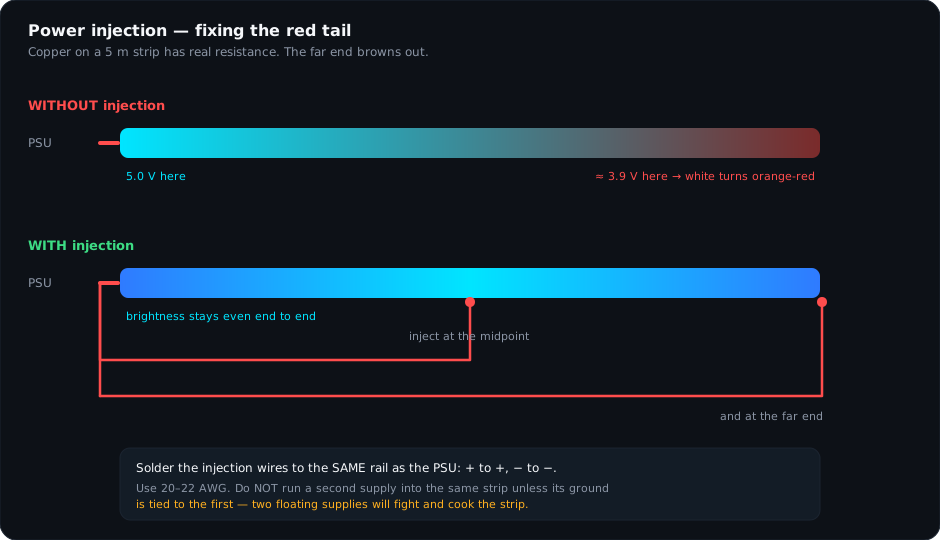
Fix it by injecting power: run a second pair of 5 V and ground wires from the same supply to the midpoint of the strip, and ideally another pair to the far end. Use 20–22 AWG. Plus goes to plus, minus goes to minus — a reversed injection wire will destroy the segment instantly.
Wi-Fi keeps dropping
- You are on 5 GHz. The ESP32 cannot see 5 GHz at all. Connect it to the 2.4 GHz band.
- The signal is weak behind a metal TV panel. A TV back is a decent RF shield. Move the controller out from directly behind the panel, or bring the router closer.
- The router changed its IP lease. Reserve a static IP for the controller in your router settings. This also fixes screen sync that "stopped working on its own".
- Brown-out reboots. If the controller reboots under load rather than dropping off the network, it is a power problem masquerading as a Wi-Fi problem — check that the ESP32 is fed from the 5 V supply and not from the strip's far end.
- Router band steering. Some routers move devices between bands automatically. If yours does, create a separate 2.4 GHz-only SSID for IoT devices and put the controller on it.
Only part of the strip lights
| What you see | Cause | Fix |
|---|---|---|
| Lights stop at a fixed point every time | LED count in WLED is lower than the physical strip | Raise the LED count in Config → LED Preferences. |
| Lights stop after a corner | DOUT wired to DOUT instead of DOUT to DIN | Re-do that corner joint. Data is one-way. |
| A dead section in the middle, working LEDs after it | One failed LED passing corrupt data downstream | Replace that single LED, or cut it out and bridge across. |
| Lights dim progressively toward the end | Voltage drop | Inject power — see the section above. |
| Tail of LEDs stays dark after you cut the strip | LED count still set for the full 300 | Set it to the number you actually connected. |
Still stuck?
Send me a photo. Reply to your order email or message @thedronacharya on Instagram with a clear shot of the controller, the strip input and the power supply, plus what the LEDs are doing. Ninety percent of the time I can tell you the answer from the photo. I answer these myself.